
The state of Haryana has witnessed rapid urbanization over the past few years. The responsibility for maintaining public infrastructure—such as parks, roads, sanitation and water facilities, as well as electricity and drainage systems—along with the administration of the ULB Haryana Property Tax, is managed by the Urban Local Bodies Department of Haryana. The ULB Haryana Property Tax is an annual levy imposed on property owners across the entire state of Haryana. The revenue generated from this tax is utilized by the Urban Local Bodies of Haryana to maintain civic infrastructure within the state’s urban areas. For instance, in Faridabad, the ULB Haryana Property Tax is one of the taxes levied on properties situated within the city.
How to Calculate Property Tax in Haryana?
Taxation of Haryana Property Tax is affected by a variety of variables, such as the nature, size and location. of the property. Here are some easy steps to determine Haryana Property Tax.
Step 1: Go to the official ULB Haryana website.
Step 2: Look for your property using details such as the property ID, owner’s name and address.
Step 3: In the next screen you will see the assessed value of property tax of your property.
Step 4: You can also re-evaluate this amount. Check your ‘Self Assessment’ or ‘Update Property Details’ option, and modify the combination of factors used to calculate the tax amount for your property.
Formula to Calculate Property Tax
Here is the formula you can use to calculate Haryana Property Tax 2026.
Property Tax = Base Value × Age Factor × Built-up Area × Category of Use × Type of Building × Floor Factor
How to Pay Property Tax Haryana Online?
The Haryana administration has endeavored to make the facility for paying ULB Haryana Property Tax available through both offline and online modes. To pay ULB Haryana Property Tax online, please follow these steps.
Step 1: Visit the official web site of ULB Haryana at ulbharyana.gov.in
Step 2: At the top of your homepage click the tab for Online Services.
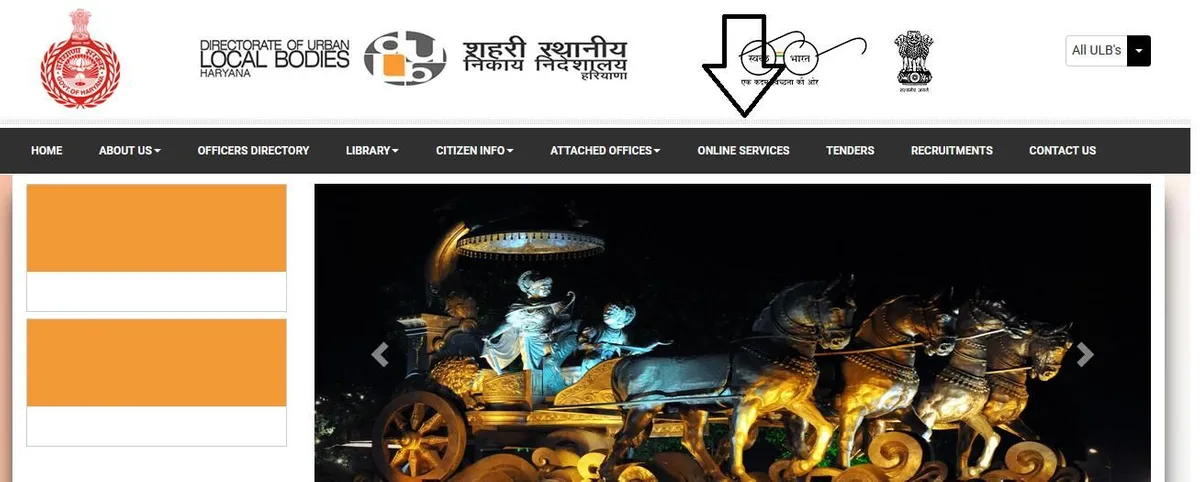
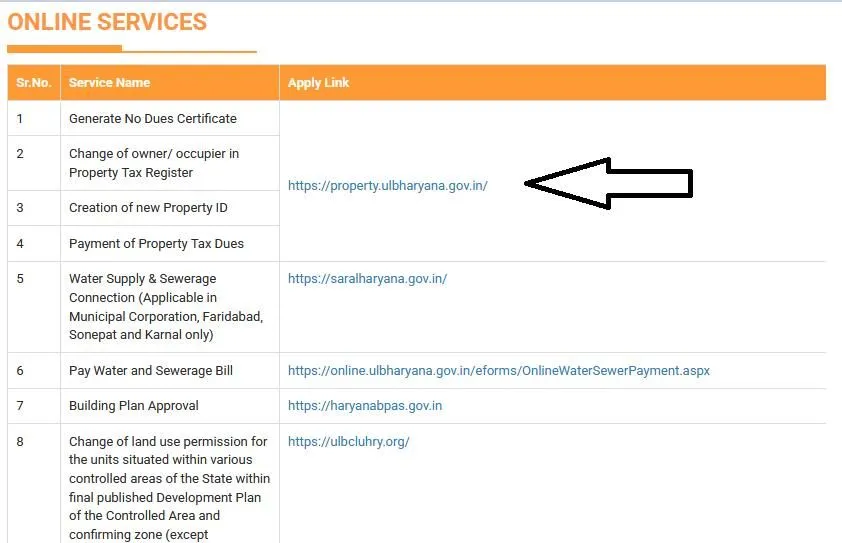
Step 3: On the next page, click on the URL (property.ulbharyana.gov.in) provided next to the ‘Payment of Property Tax Dues’ option in the ‘Online Services’ dropdown menu.
Step 4: You will be directed into the Payment of Property Tax page and The No-Dues Certification Management System page that is part of the Department of Urban Local Bodies, Haryana.
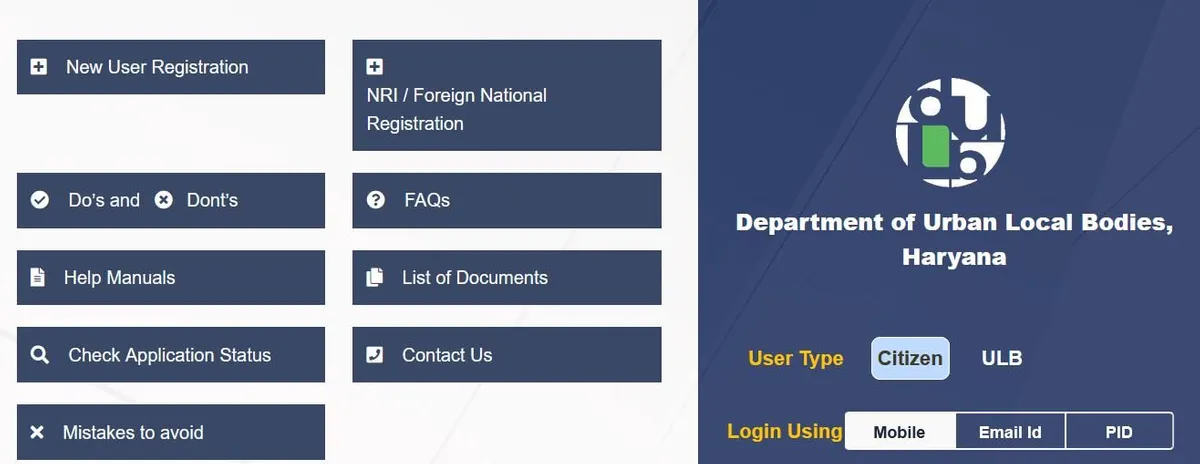
Step 5: If you are a registered user, login in using the registered mobile number. Choose Citizen from the Login Type drop-down list.
Step 6: If you are not a registered user, click on the new user registration tab and proceed with the registration.
Step 7: Once you are registered, you will be required to enter the property details such as District, Village, Locality, House number, Name of the Owner and property number.
Step 8: As soon as you fill in the details, proceed with online payment. You can use a Credit Card/Debit Card/UPI/Mobile Wallet/ RTGS/IMPS for the online payment of ULB HARYANA Property Tax.
How to Pay Property Tax Haryana Offline?
Here are a few simple steps you need to follow to pay Haryana property tax offline.
Step 1: To pay Haryana property tax offline, gather your Property ID and the necessary documents. The documents you will need include proof of identity, proof of address, property ownership documents, previous tax receipts, and a PAN card.
Step 2: Locate a place in Haryana Property Tax that falls under the jurisdiction of the Municipal Corporation and is situated near you. You may also visit any designated branch of a bank that has been authorized by the Municipal Corporation to collect Haryana property tax.
Step 3: Submit the details of your property to an authorized official and verify the property tax amount. You can also perform a recalculation to determine whether the stated property tax amount is accurate.
Step 4: Make your payment using your preferred method, including cash, demand draft, check, credit card, or debit card.
Step 5: Get your Haryana Property Tax payment receipt. It’s crucial to keep it for future references.
City-Wise Property Tax Payment in Haryana
For large cities of all sizes where property tax is applicable, the payment portal remains the same. You can pay your Haryana Property Tax by visiting the ULB Haryana website and selecting your district based on your place of residence. Click here for the hyperlink.
| Cities in Haryana | Haryana Property Tax Payment Online Portals |
| Gurugram | https://www.mcg.gov.in/ |
| Panipat | https://nagarnigampanipat.in/ |
| Other Cities | https://property.ulbharyana.gov.in/ |
How to Verify a Payment on the ULB Haryana Website?
Once a user has submitted an online payment, they can verify the payment status on the ULB Haryana website (https://ulbhryndc.org/). To confirm the online payment of ULB Haryana property tax, follow these steps:
Step 1: Visit the official ULB Haryana Property Tax website at https://ulbharyana.gov.in/ or (ulbhryndc property tax).
Step 2: From the home page, click on the ‘Online Services’ tab.
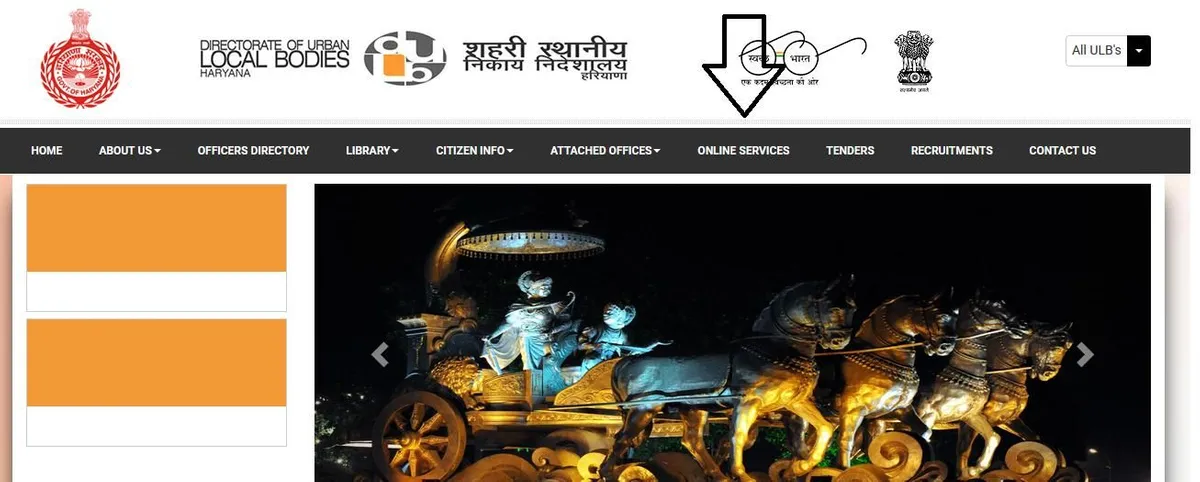
Step 3: On the next page, click on the URL (property.ulbharyana.gov.in) mentioned next to the ‘Payment of Property Tax Dues’ option in the Online Services dropdown menu.
Step 4: You will be directed to the ‘Property Tax Payment and No-Dues Certificate Management System’ page of the Urban Local Bodies Department, Haryana.
Step 5: If you are registered, log in to your account using your registered mobile number. Select ‘Citizen’ from the ‘Login Type’ drop-down list.
Step 6: Click on the Privacy Policy tab at the bottom.
Step 7: Click on the ‘Verify Payment’ tab at the top.
Step 8: The following window will appear.
Step 9: Enter the transaction number, Owner name and mobile number.
Step 10: Click the Search button. The payment status will appear on the screen.
How to Register as a New User for ULB Haryana Property Tax?
To pay ULB Haryana property tax, users must sign up via the ULB Haryana website. To sign up, you must follow this procedure:
Step 1: Go to the official website of ULB Haryana at ulbharyana.gov.in
Step 2: On the homepage, click on the ‘Online Services’ tab.
Step 3: Under this option, click on the URL in front of Payment of Property Tax Dues or https://property.ulbharyana.gov.in.
Step 4: You will be redirected to the Property Tax Dues Management Page and No Dues Certificate Management Page of the Directorate of Urban Local Bodies, Haryana.
Step 5: Click on the ‘New Registration’ button on the login page.
Step 6: A form will open. Fill in the name, father’s or husband’s names, as well as the mobile number.
Step 7: Click on the Register button. You will be registered as a User on the ULB Haryana website.
How to Create a New Property ID for ULB Haryana Property Tax Payment?
Under its unique property management system, the Government of Haryana Property Tax 2026 has assigned a distinct ‘Property ID’ to every household in the state. However, there are many households that do not possess a Property ID, and consequently, they face difficulties in paying their property tax to ULB Haryana. Here is a step-by-step guide on how to obtain a new Property ID from the ULB Haryana website.
Step 1: Visit the official website at ulbharyana.gov.in/.
Step 2: Log in using your registered mobile number and OTP.
Step 3: After logging in, the property registered in your name will appear on the screen.
Step 4: The property can also be searched for using the District, Municipality, Colony, Property ID, Owner’s Name, or Mobile Number.
Step 5: Since you do not have a Property ID, you must click on the ‘Please click here’ link provided below.
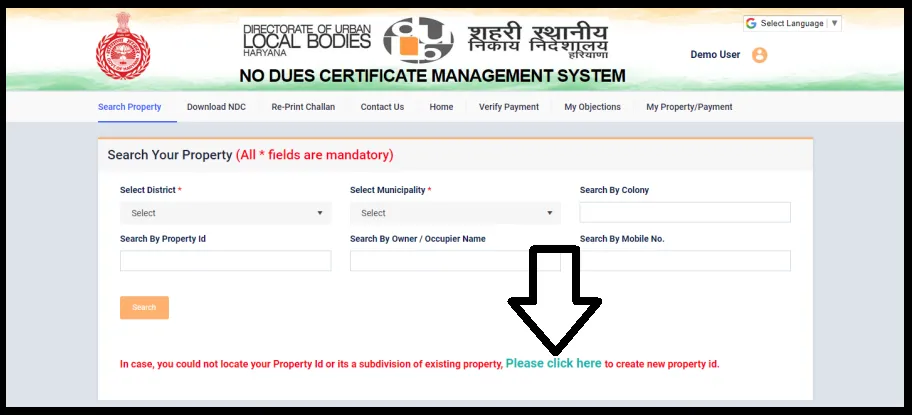
Step 6: Read the Terms and Conditions and click on the ‘Proceed’ button.
Step 7: You will be redirected to a page where you will need to provide details regarding the property and the owner.
Step 8: Select the District, Municipality, and Colony where the concerned property is located. A map displaying the boundaries of the selected colony will appear on the screen.
Step 9: Drag the pointer to mark your property and click on ‘Proceed’.
Step 10: In this step, fill in the owner’s details.
Step 11: Click on ‘Add Owner’ and fill in the details regarding the property’s construction.
Step 12: After submitting the details, a declaration will appear. Read the text carefully and click on the ‘Submit’ button.
Step 13: Once the form is submitted, you will receive an OTP on your registered mobile number.
Step 14: As soon as you enter the OTP, an Application Number will be generated.
Step 15: This Application Number will be required to check the status of your Property ID application.
How to Know the Application Status of Property ID on ULB Haryana?
After submitting your application for a Unique Property ID through the ULB Haryana Property Tax 2026, you can check the status of your application online. It is necessary to use the application number to determine the status of the Property ID allotment. This step-by-step guide will assist you in checking the status of your application online.
Step 1: Sign in the official ULB Haryana website. ULB Haryana
Step 2: On the homepage, click on the ‘Online Services’ tab.
Step 3: On the next page, click on the URL (property.ulbharyana.gov.in) provided next to the ‘Payment of Property Tax Dues’ option in the ‘Online Services’ dropdown menu.
Step 4: You will be directed onto the Payment for Property Tax page and Certificate Management for No Dues that is part of the Department of Urban Local Bodies, Haryana.
Step 5: click the option to check application status.
Step 6: Enter your application number and then click on the button to check status.
Documents Required to Pay Haryana Property Tax
The following details are requried for ULB property tax payment in Haryana.
- Unique Property ID as Assigned by the ULB Haryana
- Old Property Id (If Any)
- Owners’ Name
- Aadhar Card Number
- Address Proof
Additionally applicants could also be required submit the Haryana Property Tax 2026 invoices to pay taxes on property in Haryana.
How to Search Property to Pay ULB Haryana Property Tax
Here is a step-by-step guide to searching for a property to pay ULB Haryana Property Tax:
- Register a property using your phone number.
- View it on the dashboard – there are several tabs on the portal like Search Property, Download NDC, Challan and RePrint.
- Search the property using District, Colony, Property ID, Mobile Number, Owner City and Colony. Select the District and Municipality, and click on Search.
- All the properties will be listed with the property numbers.
How to Download ULB Haryana Property Tax No Dues Certificate
Once the payment for the ULB Haryana Property Tax is complete, you can obtain your ‘No Dues Certificate’ (NDC). Select ‘Print Receipt’ to print your receipt. Subsequently, you can download the receipt and then have it printed. Additionally, you can download the NDC by clicking on the “Download NDC” option. There, you will see a list of all the certificates issued to you. If you are looking for a specific certificate, search for it using the ‘Transaction Number’. To view and subsequently download it, simply click on ‘Download’.
Eligibility Criteria for Paying Haryana Property Tax
A person is able to claim Haryana real estate tax under the following situations:
- The person must be at least 18 years old or older.
- The person is permanent residents of Haryana.
- Any person who owns residence in Haryana Property Tax 2026 on property.
Haryana Property Tax – How to Self-Certify Your Property?
The Haryana government has launched an initiative under which property owners can self-certify their homes. Upon doing so, they will receive a 15% rebate on their annual property tax. To self-certify their property, users must follow these steps:
Step 1: Visit the website ulbhryndc.org.
Step 2: Log in to the portal.
Step 3: After logging in to the portal, all properties linked to your user account will be displayed.
Step 4: Click on ‘View Details/Self-Certify’ and proceed to the next step.
However, if no Haryana Property Tax 2026 is linked to the registered mobile number, an error warning message will appear: “No property is linked to this number. Click here to find your property and link it to this number.”
When you click on the link, you will be able to find your Haryana Property Tax 2026 by using details such as the Owner Name, PID, and Property Plot details. Once the property is found, click on ‘View Details / Self Certify’.
Which online services are provided by the Department of ULB Haryana?
The Government of Haryana has made the provision of digital services a priority. The government has worked to ensure that targeted services for the residents of Haryana are delivered through digital channels. Whether it involves paying ULB Haryana property tax, applying for a ‘No Dues Certificate,’ or paying water and sewerage bills—all these services are now available online. This not only enhances the efficiency of the system but also helps save a significant amount of time.
| 1 | Generate No Dues Certificate | https://ulbhryndc.org |
| 2 | Change of owner/ occupier in Property Tax Register | |
| 3 | Creation of new Property ID | |
| 4 | Payment of Property Tax Dues | |
| 5 | Water Supply & Sewerage Connection (Applicable in Municipal Corporation, Faridabad, Sonepat and Karnal only) | https://saralharyana.gov.in/ |
Here are the services provided under the umbrella of the Department of ULB Haryana.
- Generation of a No Dues Certificate
- Change of Occupier or Owner in the Property Tax Register
- Application for a New Property Id (For properties without property ID)
- Application for Water Supply and Sewage connection (Applicable for Faridabad, Sonipat and Karnal Municipal Corporations)
- Building Plan Approval
- Change of land use permissions
- Sale of House/Shop
- Permission for the installation of communication Infrastructure
- Marriage Registration
- Conveyance Deed
- Application and Renewal of Fire NOC
- Booking of Community Center
- License for Lodging House (Fresh and Renewal)
- Application for the installation of a temporary structure
- License for running Flour Mill
Contact ULB Haryana
You can contact the Department of ULB Haryana Property Tax 2026 at the following address-
- Phone No: 0172-2590082, 0172-2580700
- Call Timings: 9:00 Am to 5:00 pm (Monday to Saturday -Working Days)
- E-mail: [email protected]
- Office Address: Director General, Urban Local Bodies, Haryana, Bays No. 11-14, Sector-4, Panchkula
Frequently Asked Questions
Ques: What is Haryana Property Tax 2026?
Ans: Haryana Property Tax 2026 is a municipal tax charged on residential, commercial, and industrial properties in Haryana.
Ques: How can I pay Haryana Property Tax 2026 online?
Ans: You can pay Haryana Property Tax 2026 online through the official municipal corporation portal using your property ID.
Ques: How is Haryana Property Tax 2026 calculated?
Ans: Haryana Property Tax 2026 is calculated based on property size, location, usage type, and government-approved rates.
Ques: What documents are needed for Haryana Property Tax 2026 payment?
Ans: You usually need your property ID, owner details, and previous tax payment information for online payment.


Join The Discussion