
Bhu Naksha Karnataka 2026 portal is an online service that allows citizens to view and download the revenue map of a specific property. The ‘Bhu-Naksha’ application enables users to view accurate, geo-referenced Google Maps of the properties in question. It also provides digital maps of lakes and plots located within BBMP limits. Furthermore, the portal serves as a platform for accessing land maps online.
In addition to verifying plot ownership details or boundaries, ‘Bhu Naksha Karnataka 2026’ allows users to access information related to the plot, such as its ownership history. The app facilitates obtaining copies of plot survey numbers and provides user guides and specific instructions to ensure ease of use. It is also known as ‘Bhoomi Karnataka’. This guide explains how to download an online copy of a land map in Karnataka. The ‘Karnataka Bhu Naksha 2026 portal enables citizens to view and download property revenue maps online. This digital access simplifies the process for prospective buyers looking to purchase a house or a plot in Karnataka, as they can verify ownership, survey details, and boundaries before investing in the property.
Bhu Naksha Karnataka: View Land Survey Maps in Karnataka Online (Cadastral Maps)
The Karnataka Revenue Department offers an online facility to download land maps or revenue maps from the comfort of your home. Previously, downloading land maps was a difficult, tedious, and time-consuming task. Follow the steps below to download land maps for Karnataka Bhu Naksha online.
Step 1: Log in to the official website of the Karnataka Revenue Department (https://landrecords.karnataka.gov.in/index.html) or the Bhoomi portal.
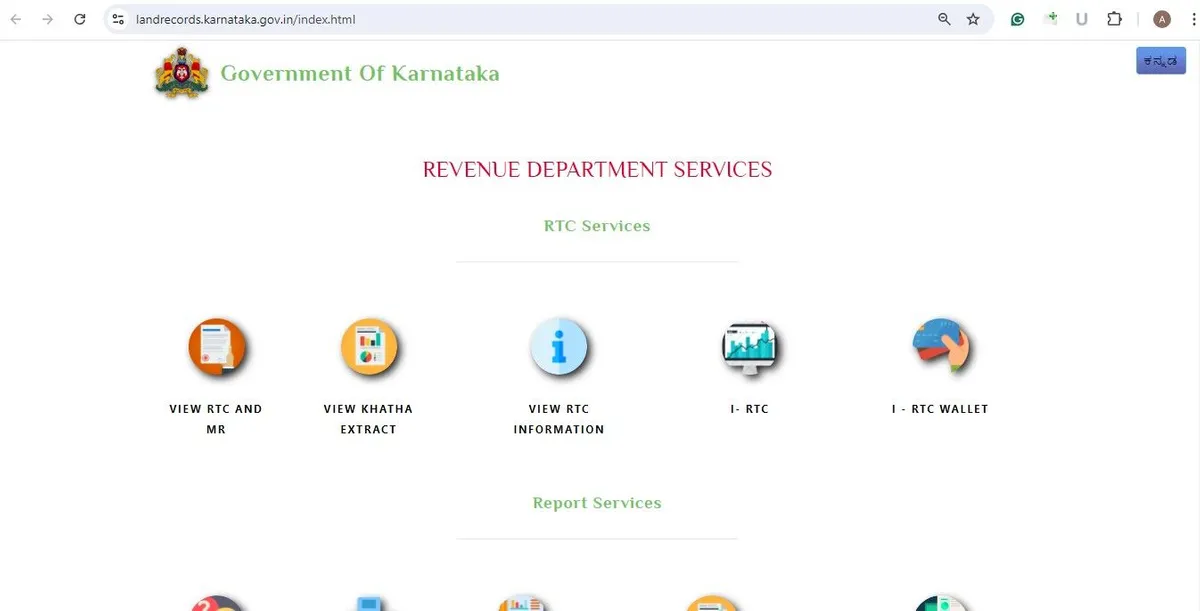
Step 2: Scroll down to the ‘Survey Services (SSLR)’ section and click on the ‘Revenue Maps’ button.
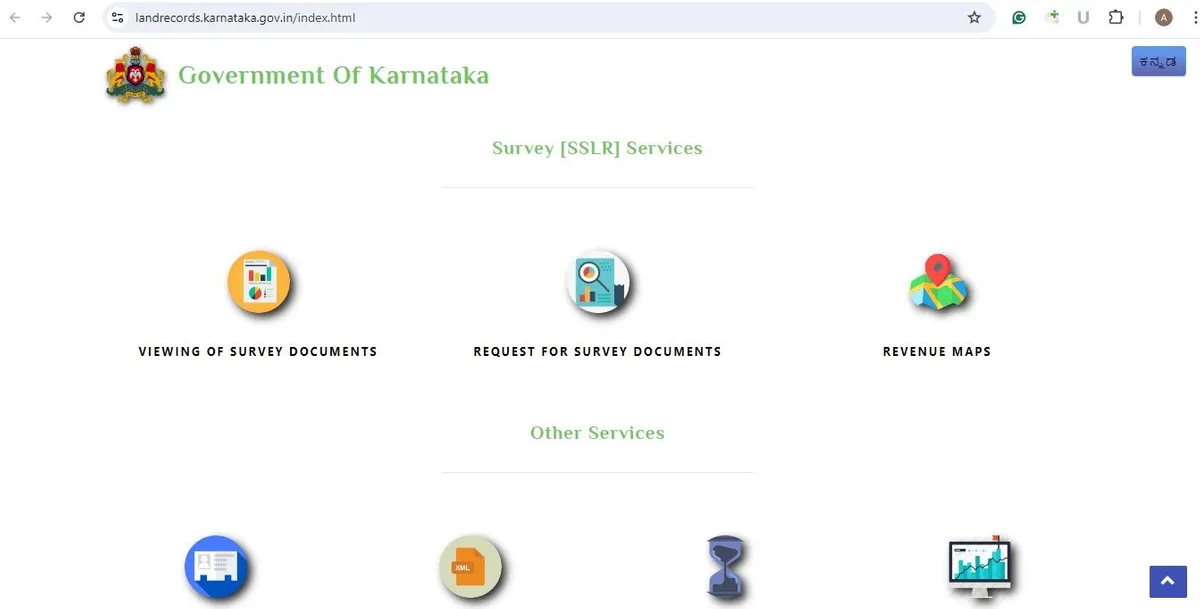
Step 3: After clicking the ‘Revenue Maps’ button, a new window will appear on your computer screen.
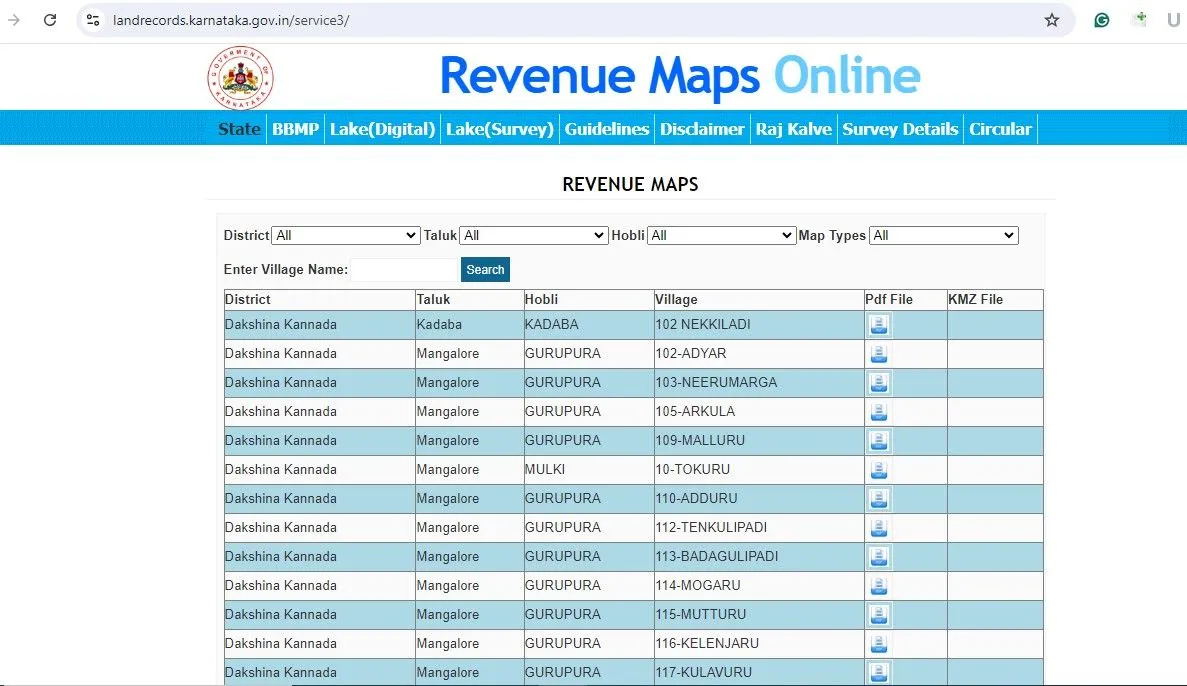
Step 4: A pop-up labeled ‘Revenue Maps Online’ will appear on the screen.
Step 5: You will need to select details such as the District, Taluk, Hobli, and Map Type. Select the information for the specific village and district for which you want the map. Choose ‘Cadastral Map’ from the Map Type drop-down menu.
Step 6: After selecting all the required details, a list will appear on the screen. This list will contain a hyperlink to a PDF file.
Step 7: Click on the PDF file; the maps will be displayed.
This map is detailed and includes information such as private land, government land, fallow land, rivers, road boundaries, and public amenities, as well as residential and commercial areas. Please note that this map is for informational purposes only and is not intended to meet legal requirements.
Bhu Naksha Karnataka: View the Land Maps in Karnataka online (Geo-Referenced Maps)
Alongside the Cadastral Maps, the land records Karnataka Bhu Naksha also allows the availability of Geo-referenced Land Maps for Karnataka. However these maps are not accessible for all districts. In the land records digitization project authorities from the Karnataka government is working to include every district in the land records digitisation project.
Here’s the step-bystep method to obtain the Geo-referenced land Maps of the district of Karnataka Bhu Naksha.
Step 1: Log in to the official website of the Revenue department of Karnataka, i.e., https://landrecords.karnataka.gov.in/index.html or the Bhoomi portal.
Step 2. In the Survey Services (SSLR) head Click on the ‘Revenue Maps’ tab.
Step 3: When you click the Revenue Maps button the system will be directed to the Revenue maps section.
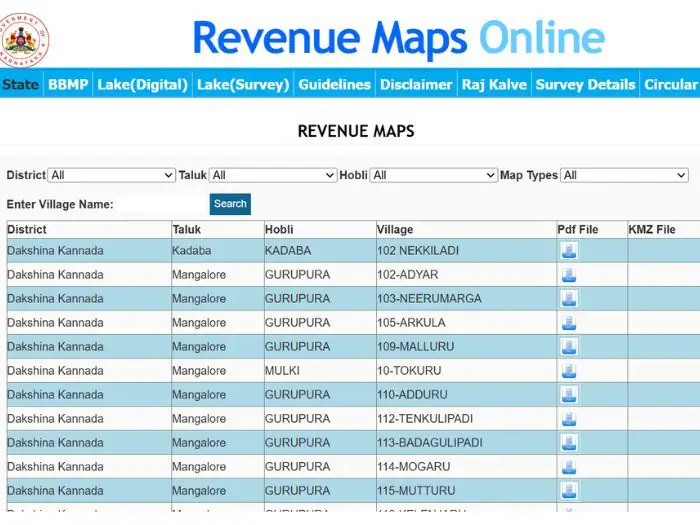
Step 4: A new window displaying ‘Revenue Maps Online’ will appear on the screen.
Step 5: On the screen, you will need to select the required details such as the district, taluk, hobli, and map type. Select the information for the specific village and district for which you wish to obtain the map. From the drop-down menu listing map types, select ‘Geo-Referenced Map’.
Step 6: Once you have selected all the necessary details, a list of options will appear on the screen. You will then be provided with a .KMZ file.
Step 7: Clicking on the file will download it to your system.
Step 8: Since KMZ files are opened using Google’s web-based application ‘Google Earth’, they can be easily viewed within that application. A geo-referenced image of Bangalore city will look similar to the image shown below.
The image below is an example; geo-referenced land maps in Google Earth appear in this manner.
Online Land Maps Karnataka- List of Districts
When Karnataka Bhu Naksha ‘2026 is a complete website that has maps of revenue and land accessible for all districts, below is a comprehensive list of districts that have map of the land and revenue are accessible through Bhu Naksha Karnataka. The residents of the districts below are able to access maps of their land. In addition, districts not listed on the map are currently being added to the platform.
| Hassan | Bagalkot |
| Bengaluru Rural | Kalaburagi |
| Bengaluru Urban | Kodagu |
| Breakdown | Bidar |
| Belagavi | Koppal |
| Ballari | Vijayapur |
| Kolar | Mysuru |
| Mandya | Chamarajanagar |
| Ramanagara | Chikballapur |
| Raichur | Chikkamagaluru |
| Udupi | Chitradurga |
| Shivamogga | Dakshina Kannada |
| Tumakuru | Davanagere |
| Dharwad | Yadgir |
| Tumakuru | Gadag |
| Uttara Kannada |
Land Maps Karnataka: Download Land Maps Ward Wise
The Karnataka government’s land records portal allows users to download geo-referenced maps of locations based on specific wards. To download a map, users simply need to select a ward. Follow these steps to download ward-wise geo-referenced Karnataka Bhu Naksha 2026:
Step 1: Log in to the official website of the Karnataka Revenue Department (https://landrecords.karnataka.gov.in/index.html) or the land records portal.
Step 2: Click on the ‘Revenue Maps’ tab under the ‘Survey Services (SSLR)’ section.
Step 3: Clicking the ‘Revenue Maps’ button will direct the system to the ‘Revenue Maps’ section.
Step 4: A pop-up displaying “Revenue Maps Online” will appear on the screen.
Step 5: Click on the ‘BBMP’ heading on the homepage.
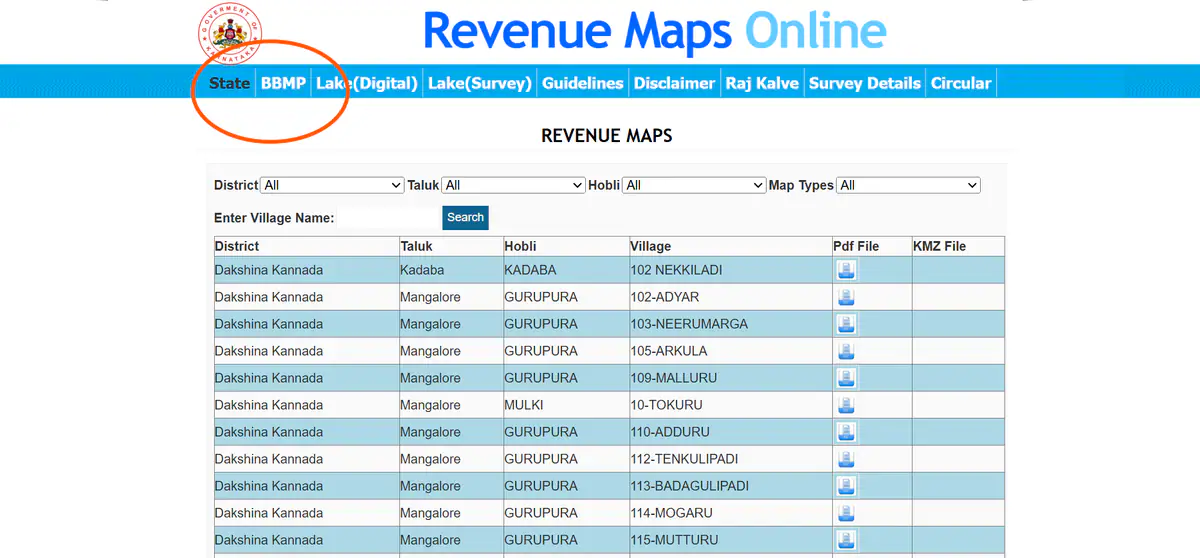
Step 6: The user will be directed to the next screen.
Step 7: Choose the appropriate ward from the drop-down menu.
Step 8: Once you have selected the ward, the KMZ download will now be prepared to downloading.
Land Survey Maps Online Karnataka: Download the Digital Map of Lakes
Users can download geo-referenced maps of the most popular lakes on the land records portal run by the Karnataka government. Users just have to select the lake of their choice and the map will be ready to download. Follow these steps to download geo-referenced maps of lakes.
Step 1: Log in to the official website of the Karnataka Revenue Department—https://landrecords.karnataka.gov.in/index.html—or the Karnataka Bhu Naksha 2026 portal.
Step 2: under the Survey Services (SSLR) head Click on the Revenue Maps’ button.
Step 3: When you click the Revenue Maps button the system will redirect you to the Revenue maps section.
Step 4: A new window with the words ‘Revenue Maps Online’ will be displayed on the screen.
Step 5: click on the “Lake (Digital)” option located on the right.
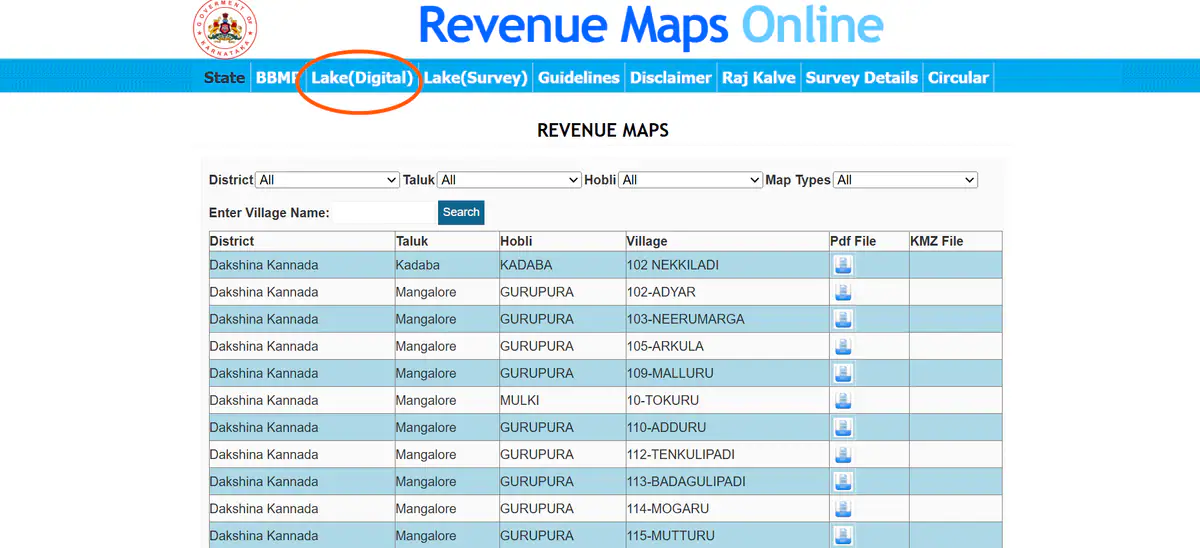
Step 6: Information such as the district, taluk, hobli, village, and survey number, along with a JPEG map of the lake, will appear on the screen.
Step 7: Click on the JPEG image to view the map of the selected lake. A geo-referenced map will be displayed in the format shown below.
Land Suvey Maps Online Karnataka: Download the Survey Map of lakes
Users can download survey maps of famous lakes from the land records portal managed by the Karnataka government. Users simply need to select the lake of their choice, and the map will become available for download. Follow the step-by-step process to download the lake survey maps.
Step 1: Log in to the official website of the Revenue department of Karnataka, i.e., https://landrecords.karnataka.gov.in/index.html or the Bhoomi portal.
Step 2: In the Survey Services (SSLR) head Click on the ‘Revenue Maps’ tab.
Step 3: When you click the Revenue Maps button The system will redirect you to the Revenue maps section.
Step 4: A pop-up with ‘Revenue Maps Online’ written on it will appear on the screen.
Step 5: click on the “Lake (Survey)” option located on the right.
Step 6: A list will appear on the screen containing details such as the district, taluk, hobli, village, survey number, and a JPEG map of the lake.
Step 7: To download the survey information, simply click on the JPEG files. The survey information will appear in your preferred format.
Advantages of Bhu Naksha Karnataka
There are several benefits to using the Bhu Naksha Karnataka portal, such as:
- Easy and quick access: Land maps can be obtained quickly online through Bhu-Naksha Karnataka, and the portal is available 24/7.
- Accurate information: Bhu-Naksha Karnataka is a reliable portal, and you can trust it to provide accurate information without errors or discrepancies.
- Easier property transactions: Having land records readily available simplifies the process of buying and selling property.
Key Features of Bhu Naksha Karnataka
Bhu Naksha Karnataka offers the most important features listed below:
- Detailed Map View: Using Bhu Naksha Karnataka, you will be able to view a full map of the land online. It clearly shows the exact boundaries of the plot and neighboring properties.
- Access Plot Division Details: Access the details about plot division and verify how the parcels of land have been divided. This is a useful detail if you need to know the physical arrangement on the land.
- Check for Land Encroachment: With Bhu Naksha you can as well determine if the property is free of any encroachments. In the long term it can lower any legal risk with buying a property.
Contact Information: Bhoomi Department of Karnataka
A user can contact the Bhoomi cell on the following address:
Bhoomi Monitoring Cell, SSLR Building, K.R. Circle, Bangalore
A user can also contact on the following telephone numbers-080-22113255
8277864065 or 8277864067 or 8277864068
OR write to the grievance cell at [email protected].
Conclusion to Bhu Naksha Karnataka
In the process of creating digital maps for cadastral areas (areas with land records), ‘Bhu-Naksha Karnataka’ facilitates transparency and easy access. This is beneficial for landowners, the state government, and other stakeholders.
Previously, retrieving land records or related information manually was a lengthy and tedious task. ‘Bhu-Naksha’ has simplified this process and made document organization easier.
Instant access to these digital cadastral maps can reduce the burden on the judiciary regarding dispute resolution. ‘Karnataka Bhu Naksha‘ can also play a pivotal role in improving land management in Karnataka, as the system undergoes continuous enhancements. Overall, the ‘Bhu-Naksha Karnataka’ land maps represent a significant step towards modernizing land-related operations.
Frequently Asked Questions
Ques. What is Bhu Naksha Karnataka?
Ans. Bhu Naksha Karnataka is an online land mapping service that allows users to view cadastral maps, plot boundaries, and survey details of properties across Karnataka.
Ques. How can I check Karnataka land maps online?
Ans. You can visit the official Bhu Naksha Karnataka portal, select your district, taluk, village, and survey number to view land maps and property details online.
Ques. What information is available on Bhu Naksha Karnataka?
Ans. The portal provides survey numbers, plot boundaries, land parcel maps, and other land-related details that help property owners verify records.
Ques. Is Bhu Naksha Karnataka free to use?
Ans. Yes, the Bhu Naksha Karnataka portal is generally available for public access, allowing users to view land maps and basic property information online without any charge.